
Select “Fuel” or “Spark” at the top to bring up the table you want to adjust. Fuel table is default when you arrive at this page.
Here you can adjust the fuel map and ignition map by percentage (e.g. +5 means 5% over the inbuilt map), in the same sort of style as a piggyback controller.
Adjust values by tapping and dragging to select either a single cell or multiple cells. Then use the “+” and “-” buttons at the bottom to adjust the selected cells.
Once you’re happy with your changes you can click “Write” (which I think sets them live but doesn’t write them, so if you turned it off and back on they’d be gone) or “Flash” which applies and stores the values so they’ll still be there once the ignition it turned off and back on.
You can make adjustments with the engine running, which is quite handy. When you write/flash the changes the engine will falter for a moment and if idling, may stall. If you give a little blip of throttle as you apply the settings, that stalling can mostly be avoided.
If you click “start diag” at the bottom you should see which cell is currently active on the bike along with RPM, TPS (throttle %), AFR (if wideband present)
Fuel table:
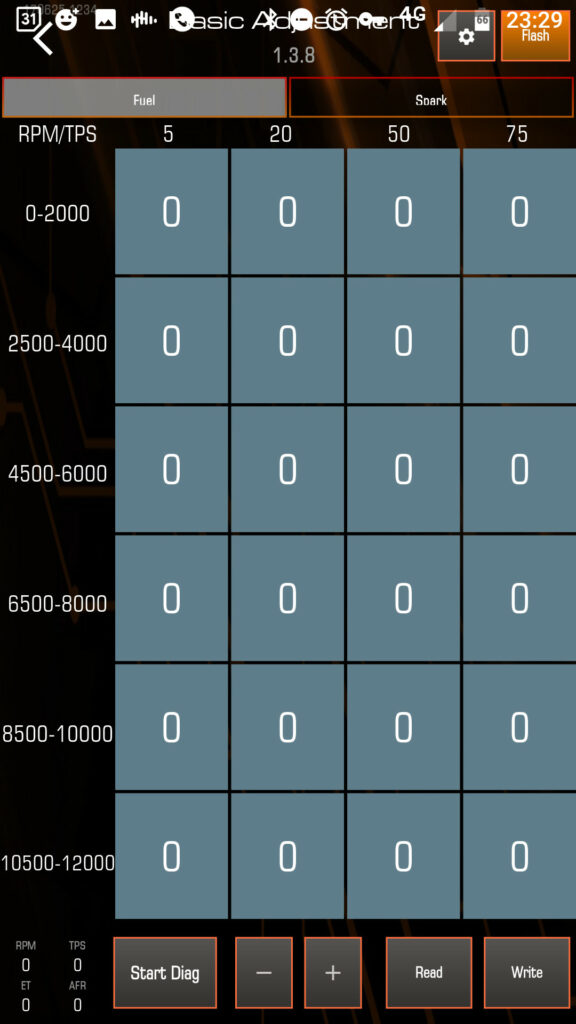
If you are trying to build a map yourself and a dyno tune is not an option for you, then this is likely the page where you’ll do most of your tuning. It should be quite a bit easier to get a usable map because there’s less cells to deal with.
Currently the ECUs come with a “baked in” fuel/spark map for the R15 (150cc) model which is popular in Asia. So for a UK/EU spec 125cc model the stock fuel map will probably be a bit rich, so we’d mostly expect to be ending up with slightly negative numbers on this page.
Ignition/spark table:
[missing spark table on basic adjustment]
The ignition page also has a “baked in” ignition map which can be adjusted in the same way, but as far as I can tell (so far) the ignition maps aren’t that different from the R125 so can mostly be left alone. There is potentially some power to be picked up on the ignition table but you can also do quite a lot of damage quite easily so this is probably best left to professionals, or at least learn about the subject beforehand (e.g. and have a way to detect knock) and proceed VERY carefully.
Do NOT go just changing values in the ignition table willy nilly. You will likely destroy your engine!
IMPORTANT!:
You may choose to use only “Basic” tuning or only “Pro” but actually both are active at once. The final fuel value (from these two tables) is the sum of the two values. Hopefully the diagram below explains it:

Initially this might seem confusing, as you might think you could potentially have a Basic map loaded, then manually load a Pro map on, thinking only that is active now but actually you’d be getting a mashup of the two.
And.. well, yes in theory that could happen, but in practice unless you copied the cell values into the Pro tables manually, any map (backup) you loaded on (restored) would have overwritten both Basic and Pro tables anyway.
However, far from an inconvenience this gives quite an interesting opportunity for testing and tuning.
Consider instead you may have a Pro map made on a dyno or from a friend, and you want to keep that map intact, but still make temporary adjustments to suit your bike. Like perhaps you think it could go a little richer at WOT (bottom right corner). In that case you can just go to the basic table and add a little fuel as a test, and go ride and see how it feels. The changes could be easily undone as they’re kept separate.
I find it’s quite easy to lose track of what you’ve changed on the pro table and even with (many) backups it can get confusing so whilst this might be a side-effect, I find this could potentially be quite a useful feature.
Essentially it could be a good way of keeping track of your changes.
Please also note: When you make a backup of your current map, it stores the fuel and ignition tables for BOTH basic and PRO pages.
